Getting Started with VeinMiner
Welcome to VeinMiner! This guide will help you quickly set up and start using this powerful ore mining add-on for Minecraft Bedrock Edition.
1. Installation
- Purchase the VeinMiner Add-On from the Minecraft Marketplace
- Click on "Activate Add-On", then either select an existing world or create a new one.
- That's all there is to do!
2. Crafting the VeinMiner Book
To access VeinMiner's settings in-game, you'll need to craft the configuration book:
- Open your crafting table.
- Place a regular book in the crafting grid.
- Place an iron ingot next to the book.
- Collect the VeinMiner configuration book from the result slot.
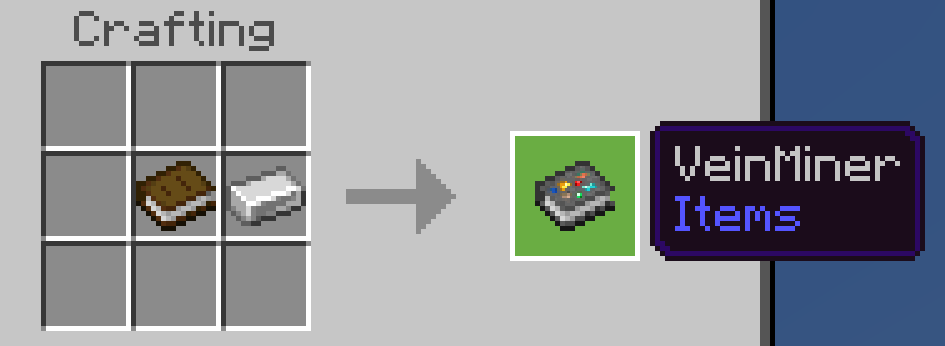
Note: You already receive a VeinMiner book by default, so you only have to craft one if you ever lose it!
3. Basic Usage
- Equip any pickaxe in your main hand.
- Find an ore vein.
- Break any block in the vein.
- Watch as the entire vein is mined instantly!
Note: By default, VeinMiner activates when sneaking. You can change this in the settings to activate while standing instead.
Important: VeinMiner respects tool tiers - you'll still need the right pickaxe tier to mine each ore type!
4. Configuring VeinMiner
- Hold the VeinMiner configuration book in your main hand.
- Use (right-click) the book to open the configuration menu.
- Navigate through the settings to customize VeinMiner to your liking.
5. Compatibility
VeinMiner is designed to work with vanilla Minecraft ores and many custom ores from other Add-Ons.
Check the compatibility page for more details.
Congratulations! You're now ready to start using VeinMiner. Happy mining!
Next Steps
- Check out the Features page to learn about all VeinMiner capabilities.
- Visit our Discord community to connect with other users and get support.